
From Sidekick to POS Hub: How Shopify Winter ’26 Rethinks Store Operations

Table of Contents

Why Shopify Winter ’26 Feels Like a Shift in How Stores Operate

In previous posts we have already outlined the strategic position of Shopify going into 2026 and beyond using Shopify’s Winter ’26 Edition update as our guiding light:

1. AI has stopped being an add-on and has started acting like an operator.
2. Commerce begins to move beyond websites and into conversations.
3. Experimentation at enterprise scale becomes built-in rather than expensive.

But, what are the the changes to the applications that are making these ideas come to life?

Sidekick and the Move Toward AI-Led Store Management

Although Sidekick has been in the Shopify platform for general use since December 2024, it is taking a more impactful role in future developments. Sidekick has moved well beyond being a simple copilot assistant.

In Winter ’26 edition, it becomes something closer to a business partner that actively works alongside you. Instead of waiting for instructions, Sidekick now surfaces insights, suggests actions, and helps execute work across analytics, design, automation, and operations.

One of the biggest changes is how proactive it has become. With Sidekick Pulse, the assistant keeps an eye on your store and flags things that matter – emerging trends, potential issues, and clear next steps – without you needing to dig through reports or dashboards. It’s designed to bring useful information to you at the moment it’s relevant, rather than forcing you to go looking for it.

Sidekick is also far more capable when it comes to actually doing things, you can now ask it to create custom apps tailored to specific needs, such as simple reorder logic, internal task trackers, or rules around returns eligibility. Instead of hiring a developer or installing another app, Sidekick can generate lightweight apps directly inside your Shopify environment, much like Make or Notion.

Automation is another area where Sidekick feels genuinely useful. You can describe a workflow in plain English – for example, what should happen when an order hits a certain value or when inventory drops – and Sidekick will translate that into a working Shopify Flow automation – but more on Flow’s capabilities later.

The same applies to reporting: it can generate custom ShopifyQL reports and visualise data without requiring technical knowledge. Building customer segments is also faster, as Sidekick can assemble them automatically based on your goals.

On the creative side, Sidekick now plays a direct role in shaping how your store looks and communicates. You can describe design changes you want to make, and it will apply those edits to your theme. It can also generate and refine product imagery, including mobile-friendly edits, using simple prompts. For marketing teams, it helps clean up and improve email copy directly inside Shopify Messaging, making campaigns quicker to launch without sacrificing quality.

There are also a number of smaller but meaningful productivity improvements. You can save common prompts as skills and shortcuts, allowing you to reuse frequent requests. Sidekick is better at handling multi-step tasks, helping plan and execute more complex changes rather than just answering single questions. It now supports voice chat in the mobile app, offers a full-screen wide mode for focused work, and provides more relevant in-context help across the Shopify admin.

Perhaps most importantly, Sidekick has a stronger sense of memory. It retains information about your store setup and preferences, which means its suggestions improve over time instead of resetting every session. With your approval, it can even assist with money management through Shopify Balance, tying financial insights more closely into day-to-day operations.

Taken together, these updates shift Sidekick from a reactive assistant into something far more practical: a tool that understands your business, anticipates needs, and helps you move faster without adding complexity.

Shopify Flow and the Rise of Everyday Automation

Shopify Flow is Shopify’s built-in automation tool, designed to take repetitive work off your plate and make everyday operations run more smoothly. Rather than relying on manual checks or third-party automation apps, Flow lets you define what should happen in your store when certain conditions are met and then handles it automatically in the background.
 
With Winter ’26, Flow becomes easier to work with and safer to use, especially as automations grow more complex. You can now preview how a workflow will behave before turning it on, which makes it much easier to spot mistakes or unintended outcomes. If something does go wrong, you’re no longer stuck waiting for it to finish – workflows can be cancelled mid-run, giving you far more control.

The editor itself has also been refined. The new layout gives more space to build and understand larger workflows, making it clearer how triggers, conditions, and actions connect. This matters most for stores that rely on automation across inventory, fraud checks, customer tagging, or order management, where even small changes can have wide effects.

What really changes how Flow feels, though, is its integration with Sidekick. Instead of building workflows step by step, you can now describe what you want to happen in plain language for example, wanting a report to be sent to accountancy for certain order sizes, and Sidekick will translate that intent into a working automation. It lowers the barrier to automation without reducing its power.

Rollouts and a Safer Way to Ship Changes

Rollouts are Shopify’s built-in way of testing and releasing changes to your store without having to rely on external tools or risky all-at-once launches. This gives you the power to make gradual A/B variant testing and only back the winners. Instead of pushing updates live and hoping for the best, Rollouts let you introduce changes gradually and see how they perform before committing fully.
 
With Rollouts, you can create multiple versions of a theme, section, or content change and control exactly when and how each version is shown. This makes it much easier to test things like new layouts, messaging, or product presentation in real conditions, using real customer behaviour rather than assumptions. Because the testing happens natively inside Shopify, there’s no extra setup or complex configuration required.
 
Scheduling is another key part of how Rollouts work. You can plan launches in advance, set start and end dates, and align changes with campaigns or promotions without needing to manually publish anything at the last minute. If a test underperforms, it’s easy to roll back or adjust without disrupting the rest of the store.
 
The real value of Rollouts is that they make experimentation part of everyday operations, not something reserved for enterprise teams with expensive tooling. By bringing testing, scheduling, and controlled releases directly into the Shopify admin, Rollouts help teams move faster while reducing the risk that usually comes with change. This push for dynamic testing and a priority in user experience is further supplemented by SlimGym…

SimGym and Testing Before Customers Ever See It

SimGym and Rollouts are designed to dovetail together, with each one handling a different stage of the same process. SimGym comes first, Rollouts comes second, and together they reduce both guesswork and risk.

In Winter ’26, SimGym moves from being an interesting concept to something much more practical and useful in everyday workflows. The biggest change is not a single feature, but how SimGym now fits into the way you test and release changes across your store.
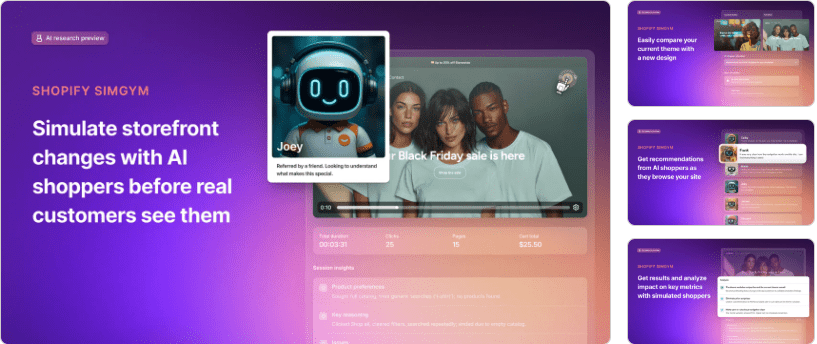
 
Before this update, most testing happened either on live traffic or through limited experiments that took time to produce results – this is prone to errors and risk. With Winter ’26, SimGym is clearly positioned as a first step, allowing teams to simulate customer behaviour before anything is published. This helps surface obvious problems early, such as changes that introduce friction, affect conversion, or unintentionally disrupt pricing or promotions.
 
The scope of what SimGym can model has also expanded. It now supports a wider range of scenarios, including traffic spikes, promotional periods, and shifts in customer intent. This makes it far more useful for planning launches, sales events, and seasonal campaigns, where the cost of getting things wrong is higher.
 
Performance improvements are another noticeable change. Simulations run faster and the results are easier to understand, which lowers the barrier to actually using the tool. Instead of analysing complex data outputs, merchants get clear signals about whether a change is likely to help, cause problems, or introduce unnecessary risk.
 
Most importantly, SimGym now feels like part of a broader experimentation workflow rather than a standalone tool. The intended path is straightforward: test ideas in SimGym, validate them with Rollouts, and then release them with confidence. That shift makes experimentation more accessible to smaller teams and reduces reliance on live customer testing alone.
 

Tinker and the Role of Creative Experimentation

Tinker is designed as a creative workspace where merchants can use AI to generate, refine, and polish visuals that are actually usable in a store or marketing campaign. You’re not just getting rough mockups or placeholders — the intent with Tinker is to help you produce assets that look like they were created by a designer, without needing separate software or complicated export/import workflows.

In Winter ’26, Tinker becomes more than just a sandbox for creative play. The changes focus on making it less of a novelty and more about making experimentation easier to turn into something usable.

One of the most noticeable changes is the range of things you can work on inside Tinker. It is no longer limited to quick image edits or rough visual ideas. You can now explore different creative directions in one place, from product imagery to promotional visuals and early animation concepts. That makes it easier to develop ideas without jumping between tools or committing too early.

The quality of what comes out of Tinker has also improved. The editing and refinement tools are stronger, so assets feel closer to being production-ready rather than just placeholders. This reduces the gap between experimenting and actually using the output, which is where creative tools often fall down.
Tinker is also easier for more people on a team to use. The workflow has been simplified so you do not need deep design experience to get value from it. Founders, marketers, and designers can all use it in different ways, which encourages more ideas to be explored rather than filtered out early.

Perhaps the most important shift is how Tinker now fits into the wider Shopify workflow. Creative ideas developed in Tinker can move naturally into SimGym for early testing, then into Rollouts for controlled release. That connection turns creative exploration into a structured process instead of a dead end.
 

POS Hub and the Push for More Reliable In-Store Systems

Shopify put a lot of work into improving the experience of using Shopify in a physical retail setting, and that effort centres on what they call the POS hub. The POS hub is a new piece of hardware designed to be the backbone of your in-store setup. Instead of relying on a tablet and a patchwork of connected devices, the hub brings more reliability and easier management to the hardware side of running a shop.
 
Another practical improvement in Winter ’26 is how the system supports connected devices. The hub acts as a central point for card readers, receipt printers, scanners, and other hardware. Because everything is plugged into one place, setup is simpler, connections are more stable, and troubleshooting becomes less of a guessing game.
 
The Winter ’26 update didn’t just stop at hardware. Retail features across the point of sale system have been refined too. Merchants on eligible plans can now manage in-store subscriptions directly at the POS, which means you can sell recurring products or services face-to-face without workarounds. Quick inventory counting from the POS makes stock checks faster during service hours. There are also improvements in how the interface can be customised, from what staff see on the screen to how receipts and grids are laid out.
 
Shipping and delivery options got a boost as well. In selected countries, same-day delivery through partners like Uber Direct is now more readily available, helping stores to compete with larger retailers that have been offering fast delivery for years.

What Shopify Winter ’26 Tells Us About the Future of Store Operations

Shopify Winter ’26 doesn’t introduce one single headline feature. What it really does is change how running a store feels day to day. Sidekick becomes something you work with, not something you occasionally ask for help. Flow, Rollouts, SimGym and Tinker quietly remove friction that used to slow teams down or force compromises. POS Hub tightens the link between online and physical retail in a way that finally feels reliable at scale.

If your business has outgrown basic setups and you’re spending more time managing processes than growing revenue, it’s worth taking a serious look at Shopify Plus and what these tools unlock when they’re fully available.

Related articles

Contact us

Let's Talk Solutions

Don’t face obstacles alone – tell us about your needs. We’ll listen, suggest options, and together build technology to accomplish your goals.

Guaranteed Follow-Up — Within One Business Day

No chasing. No hassle. It’s easy.

Schedule a Free Consultation
General Form